Database Archiving & Analytics Module
Keep Legacy Database Data Alive After System Retirement
Arkivum’s optional database analytics module enables organisations to view, query, analyse and visualise structured tabular data retained within the Arkivum digital archive. This allows valuable data exported from legacy or decommissioned systems to remain accessible and usable long after the original application has been retired.

View and access tabular data stored within the Arkivum solution

Analyse data using search, filtering and querying tools

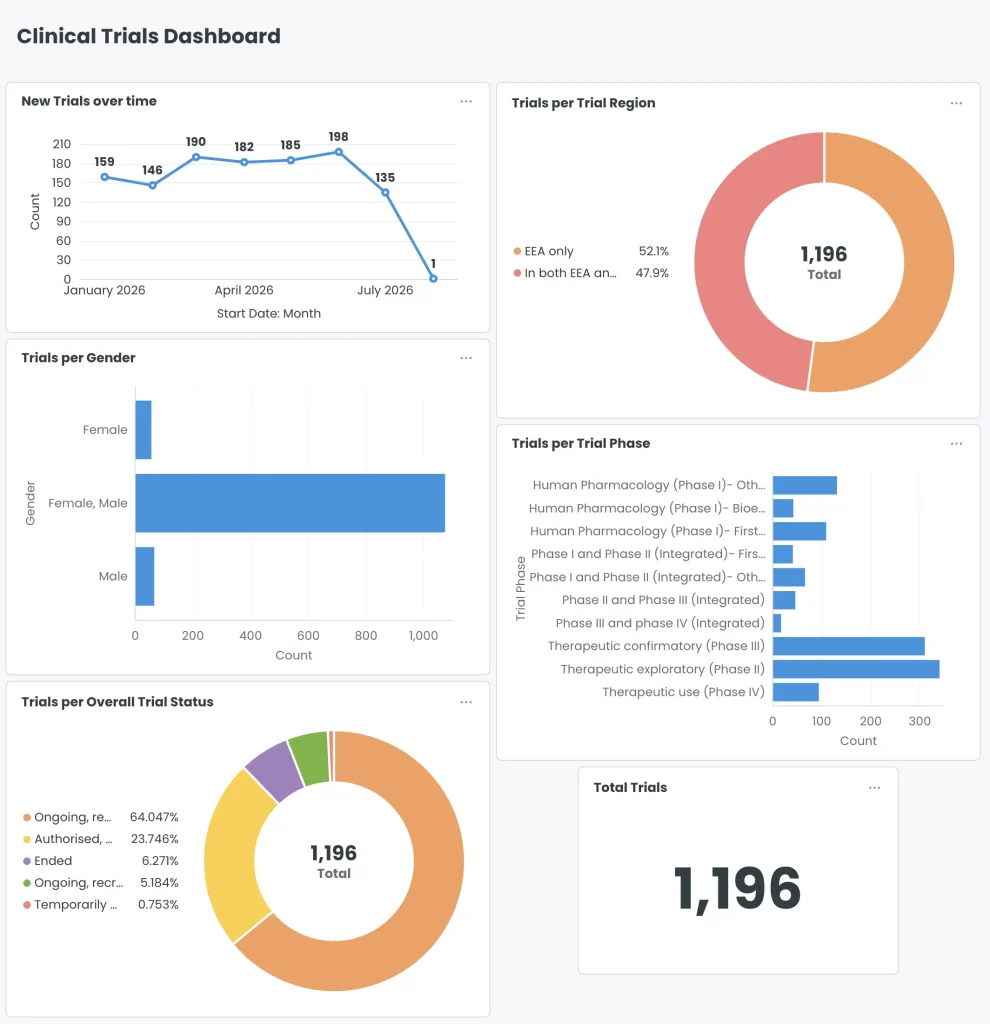
Visualise the data by building a range of plots and charts

Enable the decommissioning, retiring or consolidating of database systems
Digital transformation in recent years has seen organisations support an increasingly large portfolio of electronic systems and databases.
Many of these systems are now approaching the end of their life, require decommissioning or are being upgraded. Some still in use are becoming increasingly bloated with data, driving up costs.
Continuing to retain data within these systems can be both risky and costly.
Migrating data from these systems into a centralised archive (with database viewing and analytical functionality), enables the long-term access and use of the data, while helping reduce legacy system maintenance costs.
Arkivum’s in-archive analytics module is a business intelligence tool that supports the long-term access and use of exported database and tabular datasets.

Arkivum’s database analytics module features
A suite of tools to ensure the long-term access and use of database and tabular data exports:
- Access: View and access tabular data stored within the Arkivum digital archive solution.
- Safeguarding: Database and tabular data exports are safeguarded against corruption and loss. Files remain immutable within the solution.
- Analyse: Analysis tools enable users to search, filter and query the dataset
- Automated Summary: The module can automatically summarise the selected datasets to provide quick insights
- Visualise: Build a wide range of plots and charts directly from within the module.
- Export: Export created tables as CSV files or download built charts as images
- Connect: Link the information from your database to files within the archive
- Migration Service: Arkivum’s migration service supports customers to prepare and transform database exports for upload and ingest into the archive system.

“We realised that even without an archive, the need to archive data still existed. People simply became creative about where they stored it.”

Jens Norin, Principal Process and Governance Specialist, LEO Pharma
Arkivum’s database analytics module FAQs
Which database exports and tabular data formats does the module support?
Arkivum supports a range of different databases and database exports.
As part of the migration service, our team work with the customer to transform (if required) the export so that it is compatible with the analytics tool.
If you would like to discuss your requirements with the team, please message us via the contact us page.
How does Arkivum safeguard the archived database?
The Arkivum solution stores multiple copies of each file within the archive in three different geographic locations.
In addition to this, regular data integrity checks automatically occur throughout the lifetime of the data to identify any corrupted files. In the event of an issue being found, a healthy copy of the data can replace the damaged version.
For more information on the process, please visit our digital safeguarding page.
Can Arkivum support customers upload the database export into the archive?
Yes, Arkivum provides a dedicated migration service to support customers prepare and transform their database export, so that it is compatible with the analytics module.
Does customer data leave the Arkivum system when using the analysis tool?
No, the tool is run within the Arkivum managed AWS environment. No customer data or other information is sent outside of the archive environment.
Is the database analytics module included with Arkivum’s standard solution?
No, it’s an optional add-on module for Arkivum customers.